Godot: Dynamic First Person Controller
Technical Documentation
This documentation describes the architecture, variables, and methods used in the "Godot Dynamic First Person Controller" asset. The scripts are written in GDScript for the Godot 4.x engine.
System Architecture
The controller is divided into two main scripts to ensure modularity:
firstPersonController.gd— Main character controller (movement, physics, camera effects, audio). Attached to theCharacterBody3Dnode.SmoothFollow.gd— Script for creating a "lazy follow" effect. Attached to theSpotLight3Dnode (flashlight).
1. Controller Script (firstPersonController.gd)
This script handles character physics, input, and procedural camera animations.
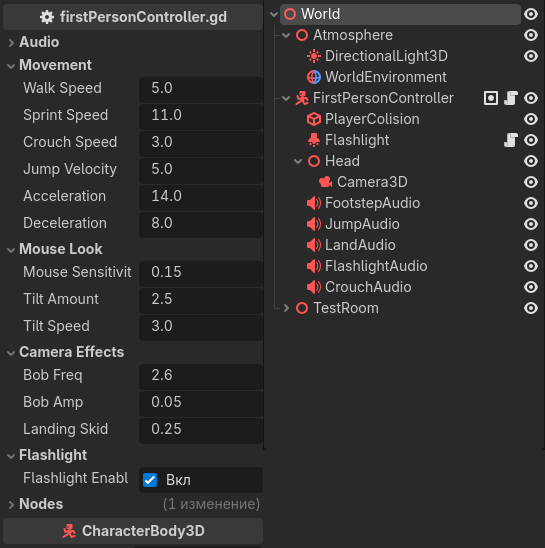
Exported Settings (Inspector)
Group: Audio
footstep_sounds: (Not directly used in current logic, reserved for an array of footstep sounds).base_step_interval: Base interval between steps (affects sound playback frequency).sfx_footsteps,sfx_jump,sfx_land,sfx_crouch,sfx_flashlight: References toAudioStreamPlayer3Dnodes for the respective actions.
Group: Movement
walk_speed(float, default 5.0): Standard walking speed.sprint_speed(float, default 11.0): Sprinting speed (while holding Shift).crouch_speed(float, default 3.0): Movement speed while crouching.jump_velocity(float, default 5.0): Jump impulse force (Y-axis).acceleration(float, default 14.0): Speed of reaching the target velocity when starting movement.deceleration(float, default 8.0): Stopping speed when movement keys are released (inertia).
Group: Mouse Look
mouse_sensitivity(float, default 0.15): Mouse sensitivity on X and Y axes.tilt_amount(float, default 2.5): Maximum camera tilt angle (in degrees) when strafing or making sharp mouse turns.tilt_speed(float, default 3.0): Camera tilt interpolation (smoothing) speed.
Group: Camera Effects
bob_freq(float, default 2.6): Head bob frequency while walking (wave speed).bob_amp(float, default 0.05): Head bob amplitude (range).landing_skid(float, default 0.25): Amount of downward camera dip on the Y-axis upon landing.
Group: Flashlight
flashlight: Reference to theSpotLight3Dnode.flashlightEnable: State variable (1 - enabled, 0 - disabled), reserved for external logic.
Group: Nodes
head_path,camera_path,collision_shape_path: Paths to key child nodes (Head, Camera, Collision).
Method Descriptions
_ready(): Called on startup. Captures the mouse cursor (Input.MOUSE_MODE_CAPTURED) and sets the initial speed._unhandled_input(event): Handles mouse movement. RotatesCharacterBody3Don the Y-axis (left/right) and theHeadnode on the X-axis (up/down). The vertical viewing angle is clamped between -89 and 89 degrees to prevent camera flipping._physics_process(delta): Main physics loop.- Applies gravity.
- Checks landing (
was_on_floor) to trigger impact effects. - Processes WASD input, normalizes the direction vector.
- Uses linear interpolation (
lerp) for smooth acceleration and deceleration. - Calls
move_and_slide(). - Calls camera bob and tilt functions.
handle_speed(): Speed state machine. Switchescurrent_speedbetween walking, sprinting, and crouching based on pressed keys (Shift/Ctrl).handle_crouch(delta): Manages crouching logic.- Detects the intent to stand up (Ctrl key released).
- Checks for overhead collisions via
is_something_above(). If there is an obstacle above the player, it forces theis_crouching = truestate. - Smoothly changes the
CapsuleShape3Dheight and theHeadnode's Y position usinglerp. - Triggers sounds and visual effects (camera shake) upon state change.
is_something_above() -> bool: Casts a physics ray (PhysicsRayQueryParameters3D) upwards from the player's center to a height ofbase_height. Excludes the player themselves from the check (get_rid()). Returnstrueif the ray hits static geometry.apply_landing_effect()/apply_crouch_impact(amount): Usescreate_tween()to create a quick, procedural animation changing the camera's Y position (simulating body kinetics).apply_head_bob(delta): Calculates the camera position using sine waves (sinfor the Y-axis,cosfor the X-axis). The effect is applied only when moving on the ground. If the player stops, the camera smoothly returns to the zero point. Synchronizes footstep sound playback with the lowest point of the sine wave amplitude.apply_camera_tilt(delta, input_x): Calculates the target camera tilt on the Z-axis, summing the input from strafe keys (A/D) and horizontal mouse movement.toggle_flashlight(): Toggles flashlight visibility and plays a click sound. Triggered by the 'F' key in the_inputmethod.play_*_sound(): A group of wrapper methods for playing sounds. They userandf_rangeto randomize pitch (pitch_scale), preventing the "machine gun" effect (repeating the exact same sound). Footstep sounds also dynamically change volume depending on the state (sprinting/crouching).
2. Smooth Follow Script (SmoothFollow.gd)
This script is designed for independent objects that need to smoothly follow the camera, creating an inertia effect (e.g., a flashlight in hand or on a helmet).
Exported Settings
target_node(Node3D): The target node the object follows. If unassigned, the script will attempt to find the active camera automatically in_ready().follow_speed(float, default 5.0): The speed at which the flashlight "catches up" to the camera. A lower value gives a more pronounced "floating" effect.offset(Vector3, default(0.3, -0.2, -0.2)): The flashlight's offset relative to the target node (camera). Set in the camera's local coordinates.
Method Descriptions
_ready():- Calls
set_as_top_level(true). This is a critically important function that detaches the node's transform (position and rotation) from its parent in the scene tree. This allows the flashlight to be inside the player hierarchy but move according to its own logic.
- Calls
_process(delta):- Position Follow: Translates the
offsetfrom local camera coordinates to global coordinates (using the camera's basistarget_node.global_transform.basis). Then smoothly moves the flashlight to this point usinglerp. - Rotation Follow: Converts the bases (rotation matrices) of the current object and the camera into quaternions (
get_rotation_quaternion()). Usesslerp(spherical linear interpolation) for smooth and mathematically correct rotation without gimbal lock. The new rotation is applied back to the flashlight's basis.
- Position Follow: Translates the
Purchase
Get this asset pack and 8 more for $20.31 USD
In order to download this asset pack you must purchase it at or above the minimum price of $1.11 USD. You will get access to the following files:
Leave a comment
Log in with itch.io to leave a comment.